

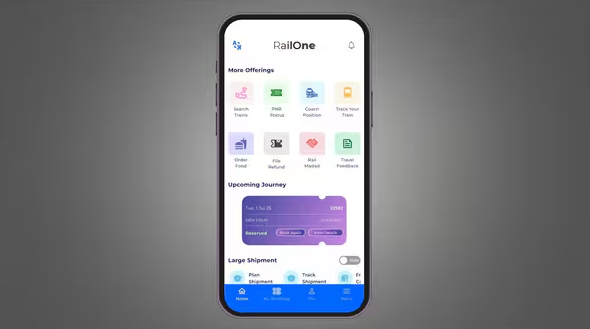
RailOne के official services और booking confirmation समझें। App feature और यात्रा के लिए valid ticket अलग जाँचें।
कौन-सी services हैं?
Ministry of Railways की public information RailOne को passenger-services app के रूप में बताती है। इसमें unreserved ticketing, live train tracking, grievance और अन्य passenger services का integration बताया गया है।
किसी screen का link partner service में खुल सकता है। Reserved/unreserved ticket, platform ticket और tracking सुविधा को एक ही booking process न मानें।
शुरुआत कैसे करें?
Official railway/CRIS source से app-store link खोलें, सही publisher जाँचें और current registration instructions अपनाएँ। Phone/location permissions उतनी ही दें जितनी chosen service के लिए जरूरी हों।
Login/verification पूरा होने पर पहले अपनी service चुनें। Ticketing में journey, passengers, class, route और fare का final summary पढ़ें; payment success के साथ actual ticket/booking reference भी देखें।
Status और यात्रा
PNR/train status useful information है, लेकिन वह गलत train/date में valid ticket का विकल्प नहीं है। Unreserved/mobile ticket की display/activation और journey restrictions उस service के rules से पढ़ें।
Wallet balance या refund pending हो तो duplicate payment करने से पहले history और reference देखें। Bank debit और booking failure के records सुरक्षित रखें।
Complaint और सुरक्षा
Official help/grievance option में booking/payment reference दें, पर public screenshots से personal details छिपाएँ। किसी agent को OTP/UPI PIN देकर refund न लें।
App feature, discounts और service partners बदल सकते हैं। इस guide में personal ticket booking या authenticated end-to-end transaction नहीं किया गया; current app instructions final operational reference हैं।
